Warning Sorry, you're using a web browser that is no longer supported. For the best experience please upgrade or visit the site on another browser.
Skip to content

How To Reset the Oil Maintenance Light on a 2006-2011 Toyota Camry

A silver 2006-2011 Toyota Camry parked in the O'Reilly garage.

The oil maintenance light on the dashboard of your 2006-2011 Toyota Camry indicates that it’s time to change the engine oil and filter on your vehicle. Maintenance lights like this on your dash are based on the mileage since your last service, and aren’t indications of an immediate problem like your Check Engine light. If the oil maintenance light is on in your Camry, it’s reminding you that your vehicle is due for its next oil change.

Step-By-Step Instructions to Reset the Oil Maintenance Light on Your Camry

Once you’ve changed your oil or had your oil changed, you’ll reset your maintenance light to make sure you’re notified next time an oil change is recommended. The reset procedure for your Camry will depend on whether or not your model is a hybrid, and what type of display you have.
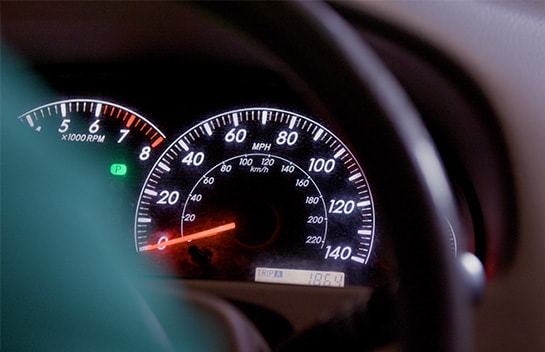
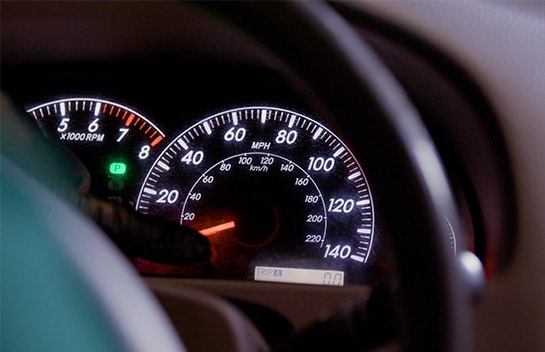
Oil Reset for Non-Hybrids

Step 15: Oil Reset for Non-Hybrids

With your ignition turned to ON, switch the display to Trip Meter A. Then set the engine start/stop switch or ignition switch to OFF while the odometer is showing Trip A. While pressing the trip meter reset button on the stem, set the engine start/stop switch or ignition switch to ON.
Step 15: Oil Reset for Hybrids

If you do not have a Multi-Information Display, continue to press and hold the button until the trip meter displays all zeroes. If you do have a Multi-Information Display, continue to press and hold the button until you see a confirmation message on the display.

Oil Reset for Hybrids

With your ignition turned to ON, switch the display to Trip Meter A. Turn off the hybrid system with the odometer showing Trip A. While holding down the trip meter reset knob, turn the Power switch to ON mode. You should see this message: MAINT REQD RESET MODE.

Hold down the knob for at least five seconds. When this message disappears and the master caution indicator light turns off, the reset is complete. You should see this message: MAINT REQD RESET MODE COMPLETE.


Additional Resources